Bulk editing looks simple until the data stops being simple. A product variant in Thor Commerce can include a name, SKU, status, barcode, weight, attribute values, metafields, and channel-specific publication dates. Putting those fields in rows and columns was the easy part.
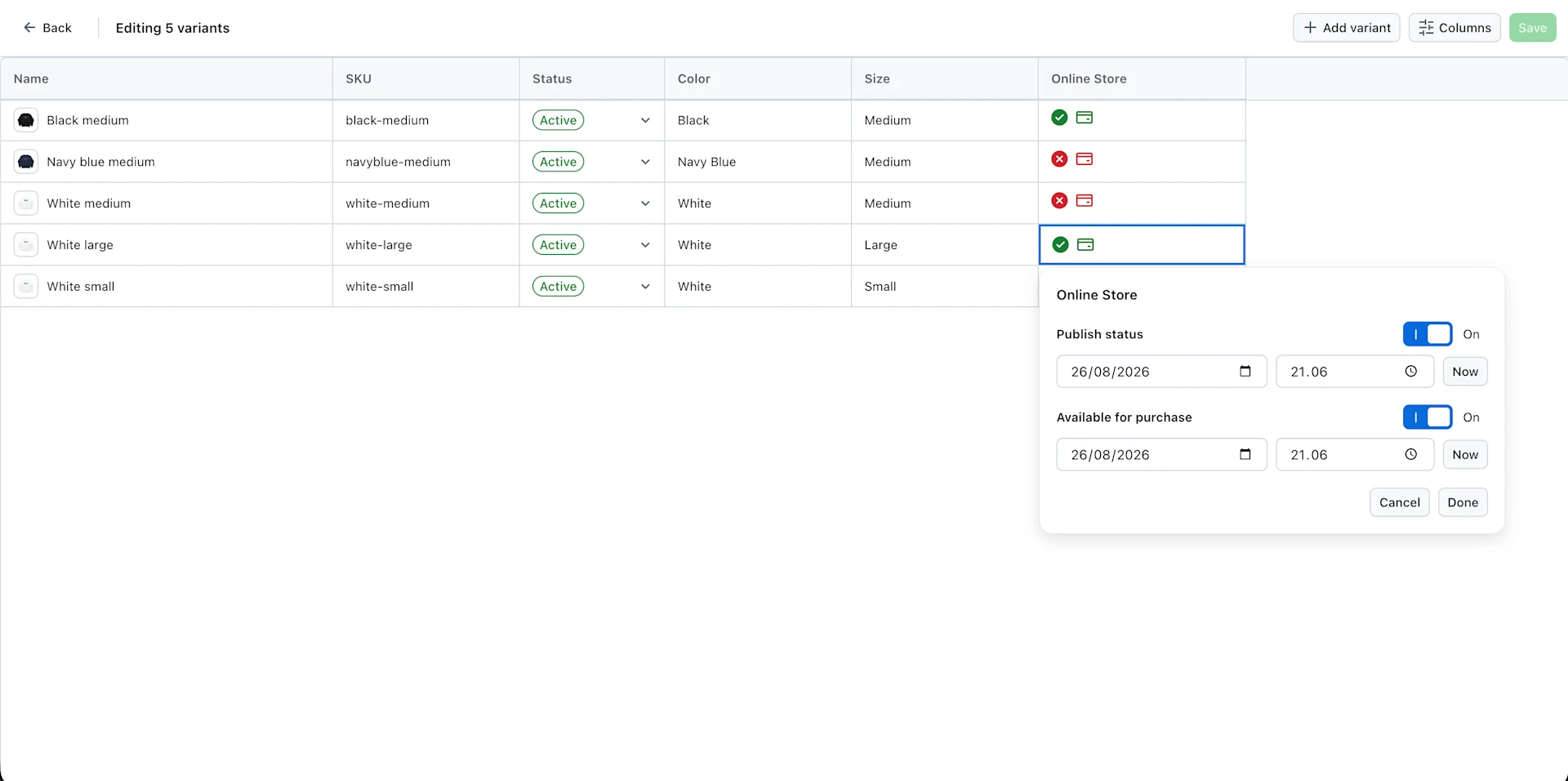
The real work was making the editor feel as immediate as a spreadsheet without losing the validation and domain rules of a commerce platform. We built the product variant bulk editor around two ideas: edits should feel immediate in the dashboard, and saving should remain a true bulk operation all the way through the API.
Why a table was not enough
A conventional table could display variants, but it did not answer the workflow questions that appear as soon as many rows become editable at once:
Can someone move through hundreds of cells without reaching for the mouse?
Can a range copied from a spreadsheet be pasted without losing each field’s type?
Can every cell use the right editor instead of falling back to plain text?
Can unsaved changes remain visible until the user is ready to commit them?
Can changed rows be persisted without sending one request per variant?
Those requirements pushed us to build a reusable data grid rather than stretch a conventional table into a spreadsheet.
A reusable grid with domain-specific columns
The grid is built on TanStack React Table for column layout and TanStack Virtual for rendering only the rows that are visible. The reusable part is deliberately domain-neutral: it knows how to focus, select, edit, validate, copy, paste, resize, and virtualize cells, but it does not know what a product variant is.
The product editor supplies that meaning through a column contract. Every column can define:
how to read and update its value
which editor to open, from text and numbers to selects, autocomplete, booleans, and custom controls
how the value should be formatted for display and the clipboard
how pasted text should be parsed back into domain data
how to validate a value before it is saved
This keeps the grid reusable while letting the product editor compose exactly the columns its data requires. Name, SKU, status, barcode, and weight are stable columns. Attributes, metafields, and publication channels are generated from the product and catalog configuration. The name column stays frozen while the rest can scroll horizontally.
Column order, visibility, and width are stored per tenant in the browser. A merchandiser can hide fields they rarely touch, bring important metafields forward, and return to the same working layout next time.
Spreadsheet behavior should be predictable
Speed comes from familiar interactions, not from making every cell look like an input. Arrow keys move the active cell, Shift extends a range, Tab moves across rows, and Enter or F2 starts editing. Typing replaces the current value, while Delete clears the selected cells.
Copy and paste use the same tab-and-newline matrix format as a spreadsheet. A single copied value can fill an existing selection. A multi-cell range is applied from the active cell, and every destination column parses its own value before the rows are updated. The same selection model also powers fill-down with Command or Control + D and the drag handle.
That separation matters. The grid owns the geometry of the operation; the column owns the meaning of the value.
Typed cells instead of generic inputs
Commerce data is structured, so the editor cannot treat everything as a string. We added custom cell behavior where the domain needed it:
Weight keeps the number and unit together, supports grams and kilograms, and can parse a clipboard value such as 250 g.
Attribute cells combine existing values with debounced search and still allow a new value when the catalog permits it.
Metafield columns select a text, number, or dropdown editor from the metafield definition and respect fields that are not editable.
Publication cells show and edit channel-specific published and available-for-purchase dates, while linked publication settings remain read-only.
The display value, editor value, clipboard value, and API value can therefore be different without leaking conversion logic into the grid itself.
Keep edits local until save
The editor keeps two versions of the rows: the current draft and the last saved state. Comparing them gives us a reliable dirty state for the page and for each cell. Users can see what changed, navigate away with an unsaved-changes warning, and decide when the work is ready to persist.
Before saving, the editor validates every visible and hidden column. If a value is invalid, the relevant column is revealed, the cell is focused, and the editor explains what must be fixed. Product-level checks catch cases that cannot be understood by one cell alone, including required attributes and duplicate attribute combinations for new variants.
Only rows that differ from their saved version are included in the update. New draft rows are created in bulk and then replaced with the variants returned by the API, so the local editor continues from the persisted state instead of guessing identifiers.
Bulk all the way through the API
A fast grid would still feel slow if saving fanned out into one mutation per row. For ordinary variant changes, the dashboard sends every changed variant through one productVariantsBulkUpdate mutation. New variants use the corresponding bulk-create mutation, and publication changes are grouped into one bulk publication request.
On the backend, the update handler loads the product once, checks changed SKUs for conflicts, resolves metafield definitions, applies the requested changes to the product aggregate, and persists the result once. Domain errors such as duplicate SKUs or invalid attribute combinations come back through the GraphQL payload instead of leaving the dashboard to reconcile a collection of unrelated requests.
There are a few cases where different mutation types are intentionally sequenced—for example, creating new variants, resetting assigned metafield values, updating existing variants, and changing publications. The editor records each completed stage before moving on, so an error in a later domain does not make an earlier successful operation look unsaved.
Designing for real product catalogs
The editor is opened from the variant list with the selected variant IDs. Product connections are paginated, so the route preloads the first page and resolves any selected variants that are not already present. This allows selections made after loading more pages to reach the editor without asking the grid to understand pagination.
Inside the editor, row virtualization keeps rendering work tied to the viewport instead of the size of the selection. Frozen columns, configurable widths, and persisted column preferences keep wide catalog schemas usable without turning the interface into a wall of fields.
What we learned
Spreadsheet-like is a behavior contract, not a visual style. Selection, focus, clipboard, and keyboard rules have to work together.
Types belong at the column boundary. Parsing and formatting next to the field definition make copy, paste, validation, and custom editors consistent.
A bulk interface needs a bulk backend. Grouping work in the browser is not enough if the API still performs one operation per row.
Failure states are part of the architecture. Draft state, focused validation errors, and persisted-progress tracking make the save flow understandable.
The result is a bulk editor that feels familiar without pretending commerce data is a flat spreadsheet. It gives teams a faster way to work across product variants while keeping Thor Commerce’s catalog rules, GraphQL contracts, and save semantics intact.